

Decent Icons (2016)
Tags:
Early AccessUtilitiesDesign & Illustration
| PC |
Released: 2016-04-07Requirements
|
Description
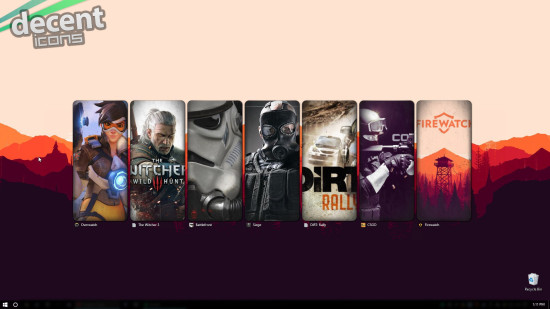
Decent Icons is a versatile Game Launcher designed specifically for Windows, offering users full creative control over how they organize and present their game and software icons. This application allows the creation of custom icons from a wide range of sources, including screenshots, wallpapers, box art images, and fan art. The process requires no additional photo editing skills, making it accessible to both casual and advanced users.
Key Features
- Custom Icon Creation: Users can generate icons of any size or shape, adapting them to fit personal preferences or desktop layouts.
- Image Sources: Any image in .JPG or .PNG format, including those with transparency, can be used for icon creation. This includes game screenshots, wallpapers, box art, or fan-made artwork.
- Edit Mode: The launcher includes a simple Edit Mode, enabling easy scaling, cropping, and adjustment of images to fit the desired icon style.
- Extensive Customization Options: Decent Icons provides multiple visual enhancements, such as automatic startup without Steam, highlight effects, titles, overlays, vignette, bevel, and reflection adjustments.
- Library Management: Users can add individual favorite games for quick access or explore a larger library using a scroll mode for convenience and organization.
- Continuous Development: The application is actively developed with community involvement, ensuring that user feedback contributes to improvements and new features.
Planned Updates
- Support for multiple rows of icons for improved desktop layout management.
- Introduction of tab functionality to better organize games and software categories.
- Additional features and enhancements based directly on user feedback and community suggestions.
System Requirements
Decent Icons is compatible with Windows Vista and above. Users should be aware that it may have compatibility issues with DeskScapes by Stardock Software, which could affect performance or display options.
Community and Support
The developers encourage active participation from users to help shape the future of the software. Feedback, suggestions, and bug reports can be submitted through the Steam Community discussion page dedicated to Decent Icons, allowing for ongoing updates and improvements.
Usage Overview
With Decent Icons, users can completely transform the visual presentation of their desktop, creating a personalized interface that reflects their individual taste. The tool is designed to be intuitive, allowing icon creation and customization in a straightforward process. Its combination of flexibility, community-driven development, and a broad range of customization options positions Decent Icons as a practical choice for anyone seeking to enhance their Windows desktop experience.
Our Verdict
Decent Icons is a solid tool for anyone who likes to customize their desktop. It lets you create game and software icons from any image without needing extra editing software. The interface is simple and easy to use, so even beginners can start right away.
The app gives you plenty of options to tweak your icons, from size and shape to reflections and overlays. Continuous updates and community input mean it keeps getting better over time. It works on most modern Windows systems, though some users might run into conflicts with certain other programs.
Overall, we recommend Decent Icons. It’s fun, easy, and flexible, giving you full control over your desktop look. A great pick if you enjoy personalizing your PC without hassle.