

VR Swing Table Tennis Oculus (2016)
Genres: Sports
Tags:
SingleplayerVR
| PC |
Released: 2016-12-16Requirements
|
Description
VR Swing Table Tennis Oculus (2016) offers an innovative approach to virtual reality gaming by transforming your everyday smartphone into a fully functional VR table tennis racket. This game does not require traditional VR controllers such as Oculus Touch or Xbox controllers. Instead, it utilizes a simple, intuitive setup where your Android device serves as the primary input tool, making the experience accessible and straightforward for all players. Timing, focus, and precision are the only skills required to master the game, along with the added feature of executing a powerful Special Smash by shouting into your device. Players should be cautious not to lose grip of their device during intense gameplay, as the game assumes responsibility for the racket is not provided.
Setup Instructions
- Download the main game software for your PC from Steam.
- Install the companion “Racket” app on your Android smartphone via Google Play Store at this link.
- Launch the game on your PC first.
- Open the Racket app on your Android device.
- Once both components are running, you can begin playing VR Swing Table Tennis.
Important: The game must be launched on your PC before starting the Racket app on your Android device. Following this sequence ensures the game functions correctly and prevents connectivity issues.
Gameplay Mechanics
- The game automatically begins when the Racket app is launched after the PC game is running.
- Players swing their Android device to hit and return the table tennis ball, providing a realistic and immersive experience.
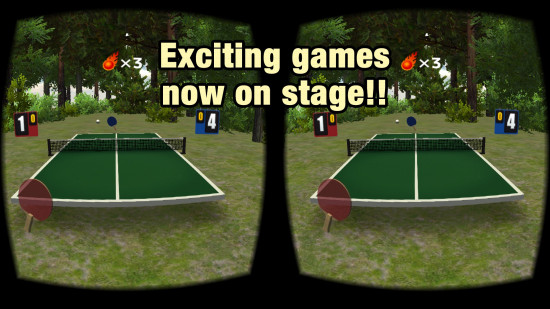
- Shouting into the device activates the Special Smash feature. A visual indicator with red balls at the top of the screen displays the remaining number of Special Smash opportunities.
- Menu navigation is managed by tapping or swiping on the Android device’s screen, allowing easy access to game settings and options.
- Three distinct table tennis locations are available for selection, each offering unique visual environments and gameplay variations.
Device Compatibility
Currently, the Racket app is fully supported only on Android devices. iOS support is planned for future updates, expanding accessibility for a wider audience. VR Swing Table Tennis explores the potential of using smartphones as input devices for VR applications, demonstrating how mobile technology can enhance immersive gaming without requiring specialized hardware.
Development and Future Plans
The developers of VR Swing Table Tennis aim to continue evolving this concept by creating additional VR games that use smartphones as input devices. The team actively encourages player feedback to refine gameplay, improve mechanics, and introduce new features in future releases. This approach highlights the ongoing commitment to expanding VR experiences and making them more interactive and accessible.
Key Features
- Smartphone-based VR racket input, eliminating the need for additional VR controllers.
- Simple gameplay requiring timing, precision, and minimal technical skill.
- Special Smash feature triggered by voice commands.
- Multiple playable locations providing varied environments.
- Intuitive menu navigation using taps and swipes.
- Android support with iOS compatibility planned.
- Encouragement of user feedback to improve future updates and games.
VR Swing Table Tennis Oculus (2016) demonstrates a novel use of mobile technology to enhance virtual reality gaming, offering a combination of accessibility, interactive gameplay, and immersive experiences. The game’s design emphasizes player engagement and provides a foundation for future VR innovations using smartphones as primary controllers.
Our Verdict
If you're looking for a simple, quirky VR game, VR Swing Table Tennis might just be your thing. The concept is interesting—your smartphone acts as the racket, and all you need is timing and a bit of excitement to enjoy the game. It's easy to set up, with just a few steps to get started. The VR experience works smoothly, and shouting into your phone for a special smash is a fun touch. However, it’s clear that the game could use more polish. There’s limited platform support right now (only Android devices), and while the gameplay is straightforward, it might lack depth for more seasoned gamers.
Overall, it's a solid, casual VR game for beginners or anyone looking for a lighthearted experience. However, hardcore players might find it too basic and lacking in complexity. If you're okay with a simple, fun diversion, give it a try. But if you're expecting a more immersive or challenging VR experience, this might not be the right fit.