

Think Space (2016)
Tags:
MultiplayerVRHand-drawnReal-TimeUtilitiesDesign & IllustrationExperience
| PC |
Released: 2016-07-26Requirements
|
Description
Think Space (2016) is an advanced virtual reality application designed for brainstorming and collaborative work in immersive environments. The software enables users to create and manipulate an unlimited number of virtual whiteboards, providing a versatile workspace for remote teams. Users can conduct sessions from visually distinct settings, including a serene tropical beach or an expansive desert landscape, enhancing focus and engagement during collaborative activities.
Key Features
- Multiuser Meetings: Start or join virtual meetings with multiple participants, allowing real-time collaboration across distances.
- Integrated Voice Communication: Engage in discussions with built-in voice chat functionality during meetings, ensuring smooth and immediate communication between team members.
- Environment Options: Work within two distinct virtual scenes – an Island or Desert – providing varied immersive backgrounds to suit different working preferences.
- Document Management in VR: Save and open documents directly from within the virtual reality environment, maintaining continuity of work without leaving VR.
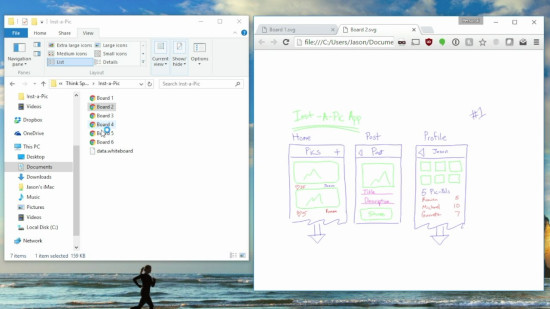
- Whiteboard Export: All whiteboards created in Think Space can be exported in SVG image format, making it easy to share work across web browsers and other platforms.
- Vector-Based Drawing: Draw using smooth vector graphics that maintain clarity and precision within the VR workspace.
- Multiple Marker Colors: Choose from four different marker colors to differentiate ideas and highlight key points effectively.
- Text Editing Tools: Utilize the eraser tool to remove unwanted text or marks from whiteboards, ensuring clean and organized notes.
- Board Manipulation: Add multiple boards into the virtual scene and reposition them freely, allowing for dynamic arrangement and structured presentations.
- Scene Navigation: Move around the virtual environment using teleportation, providing an intuitive and efficient way to explore and interact with the workspace.
Usage and Workflow
Think Space allows teams to collaboratively develop ideas without the limitations of physical space. By providing unlimited whiteboards, the app ensures that users can explore concepts extensively and visually organize information in real time. The integration of voice chat supports clear communication, reducing the need for external conferencing tools. Exporting work to SVG format facilitates seamless sharing and archiving, ensuring that all contributions are preserved and accessible outside of the virtual environment.
The app's design accommodates both creative and structured work processes. The selectable environments, Island and Desert, offer visually distinct settings that can enhance user focus and provide contextual variety. The vector-based drawing system ensures all sketches and notes are precise and legible, while the color selection and eraser tools provide straightforward options for editing and categorizing information. Boards can be easily added, repositioned, and navigated within the scene, allowing users to customize their workspace layout according to project requirements.
Conclusion
Think Space (2016) delivers a comprehensive solution for remote collaboration and creative brainstorming in virtual reality. Its combination of multiuser support, integrated voice chat, flexible scene options, advanced whiteboard tools, and seamless document export makes it a practical and efficient platform for teams looking to innovate and organize ideas visually. The application bridges the gap between traditional brainstorming and immersive technology, enabling productive virtual collaboration across various industries and work contexts.
Our Verdict
Think Space offers a solid virtual reality brainstorming experience, but it’s not without its flaws. The concept of creating unlimited whiteboards and collaborating in virtual environments like a tropical beach or desert is cool, and the ability to export your work as SVG files is a nice touch. The smooth vector drawing and multiuser meetings with built-in voice chat add value for remote teams.
However, while the app is useful for virtual collaboration, the overall user experience could be more polished. The interface, though functional, may feel a bit clunky for users unfamiliar with VR tools. If you're looking for a simple, immersive way to brainstorm in a virtual setting, Think Space is a solid choice. Just be prepared for a learning curve when navigating its features.