

CopperCube 5 Game Engine (2015)
Genres: Educational
Tags:
Includes level editorEducationUtilitiesDesign & IllustrationAnimation & ModelingGame DevelopmentSoftware Training
| PC |
Released: 2015-05-01Requirements
|
Description
CopperCube is a versatile and powerful 3D game engine that allows users to create interactive 3D games, applications, and websites without the need for programming knowledge. This intuitive platform is designed for both beginners and advanced users, offering a wide range of tools and features to create immersive and engaging 3D content. With its user-friendly interface and comprehensive set of features, CopperCube makes game development accessible to anyone.
Key Features
Full-Featured 3D Engine
The engine includes fully optimized 3D engines that are capable of running on all supported platforms with OpenGL, Direct3D, WebGL, and Stage3D. CopperCube provides high-performance 3D rendering, ensuring smooth gameplay and stunning visuals across various devices.
Simple-Click Game Creation
CopperCube eliminates the need for programming by providing an easy-to-use, simple-click system for creating games. Whether you're developing a simple 3D game, an intricate adventure, or a first-person shooter, the engine offers a variety of pre-configured behaviors that can be easily customized to suit your needs. The intuitive drag-and-drop interface allows for rapid game development without any coding skills required.
Terrain Editor
The built-in terrain editor enables users to create expansive 3D worlds directly within the engine. Textures can be painted seamlessly onto the terrain, with automatic blending for smooth transitions. Tools for placing grass, bushes, and trees are included, allowing users to craft dynamic and lifelike environments.
Advanced Physics Engine
CopperCube comes equipped with a fast and efficient collision and response system, along with a fully integrated physics engine when publishing as a Windows or Mac OS X application. This ensures that the game world behaves realistically, with physics-based interactions and realistic object movements.
Character Animation
Users can create and animate 3D characters using any external 3D software. These models can then be exported to one of the supported file formats and imported into CopperCube for use in your game or application. Additionally, pre-existing 3D models can be downloaded from the web and imported into the editor to enrich your projects.
Low-Poly Editing Tools
CopperCube includes a simple 3D modeling tool for editing your own low-poly 3D models. This feature is perfect for creating levels, objects, and items directly within the engine, saving time and effort while working on your project.
Cross-Platform Scripting System
For advanced users, CopperCube offers a powerful scripting system with full support for JavaScript. This API works across all supported publishing targets, allowing you to enhance your projects with custom scripts. If you are targeting Flash, you can use ActionScript 3, and for WebGL, an additional JavaScript library provides direct access and is even open-source, giving users more flexibility and control over their games.
High-Quality Light Mapping
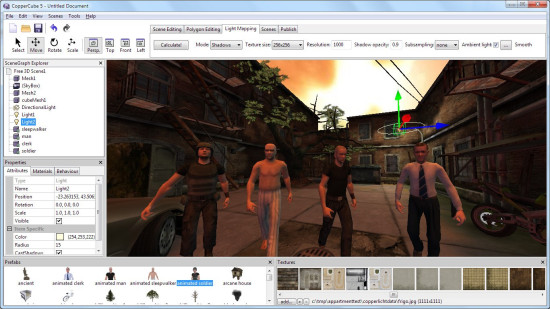
The engine includes a high-quality light mapping tool that helps enhance the visual appeal of your 3D worlds. By placing lights in the scene and clicking 'calculate,' CopperCube generates accurate and realistic light maps, ensuring your levels look stunning with minimal effort.
Native WebGL Support
Unlike many other 3D engines, CopperCube’s WebGL implementation is optimized and manually written, ensuring fast download speeds and smooth performance even on websites. The WebGL client is only about 200 KB in size, making it lightweight and fast, delivering an impressive user experience on the web.
Multiple Publishing Targets
With CopperCube, you can publish your 3D games across multiple platforms with just a single click. The engine supports the following targets:
- Windows (.exe) apps
- Mac OS X (.app) apps
- WebGL websites (.html)
- Android (.apk) apps
- Flash websites (.swf)
This flexibility allows you to reach a wide audience across different devices, including iPhones and iPads, through WebGL and Flash support.
Basic Edition vs. Professional Edition
The Basic Edition of CopperCube offers the ability to create 3D games, apps, and websites with a maximum of 10 scenes per file. If you need more advanced features, you can upgrade to the Professional Edition via downloadable content (DLC). The Professional Edition removes the scene limit, adds video playback support, includes a scene metrics tool, and introduces additional advanced features, such as a command-line interface (CLI) for more experienced developers.
Conclusion
CopperCube is an all-in-one 3D game engine that combines ease of use with powerful features. Whether you’re a hobbyist or a professional game developer, CopperCube provides the tools you need to create high-quality, cross-platform 3D games, applications, and websites without writing a single line of code. Its intuitive interface, advanced capabilities, and support for various publishing targets make it an ideal choice for developers of all skill levels.
Our Verdict
CopperCube 5 is a solid choice if you want to make 3D games or apps without learning programming. The editor is easy to use, comes with lots of ready-made tools, and lets you build worlds quickly. You can create terrains, add characters, and even animate them, all in one place.
Advanced users will appreciate the JavaScript support, shader options, and optimized WebGL output. It runs smoothly on Windows, Mac, Android, and the web, making your projects widely accessible. The built-in physics and light mapping make your games look and feel polished.
Overall, CopperCube 5 is worth trying if you want a fast, flexible engine for 3D projects. Beginners can get started easily, and pros can dive deeper with scripting and advanced features. We recommend it for anyone looking to create 3D content efficiently.