

MyDream Swift (2016)
Tags:
VRUtilitiesSoftware
| PC |
Released: 2016-04-06Requirements
|
Description
MyDream Swift is an innovative tool that allows players to transform their existing non-VR games into immersive virtual reality experiences. This software offers a seamless integration of VR capabilities into popular gaming titles, as well as a desktop viewer feature for browsing the web, watching videos, or simply using your computer in virtual reality. Swift delivers an enhanced gaming experience by providing a fully immersive environment where players can engage with games and applications in a more interactive and dynamic way.
Key Features of MyDream Swift
Swift is equipped with a range of features designed to optimize your gaming and computing experience in virtual reality. Some of the most notable functionalities include:
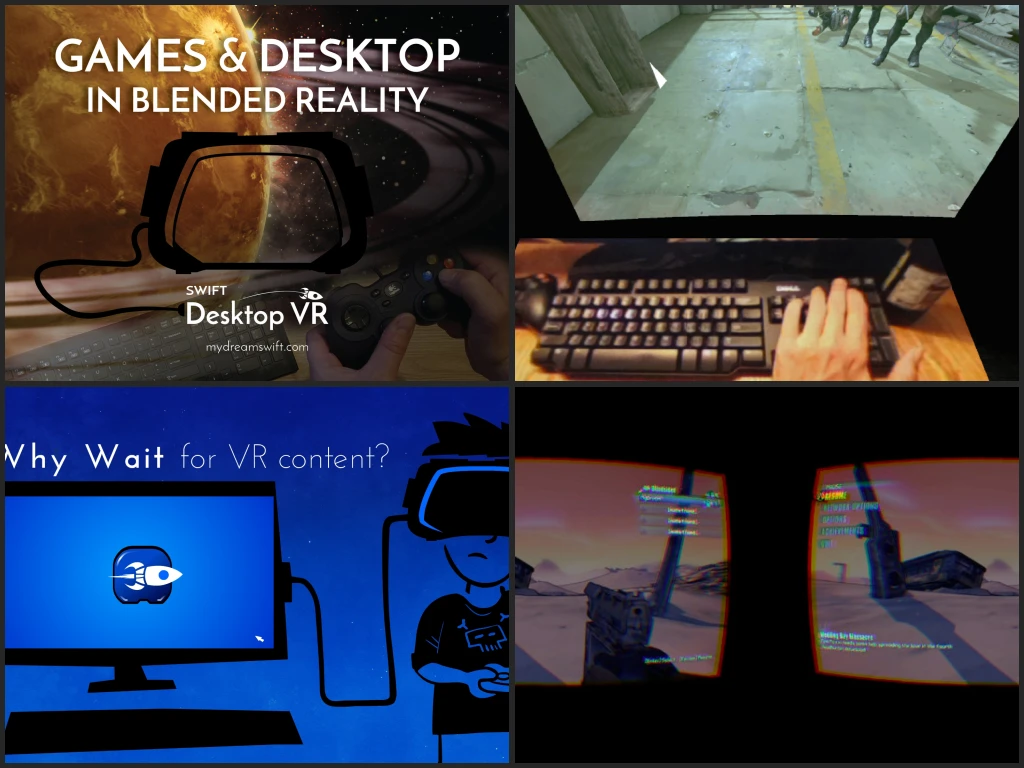
- 360-Degree View with Head Tracking: This feature enables players to enjoy a fully immersive, first-person perspective experience in their games. Swift uses head tracking to provide a 360-degree view within supported titles, ideal for shooters and other first-person games.
- Cinema Mode: A great option for casual gaming or movie watching, Cinema Mode allows players to enjoy their games or videos on a large virtual screen, complete with support for stereo 3D content in a side-by-side format.
- Desktop Viewer: Swift includes a desktop viewer feature that enables users to interact with their Windows apps or browse the web while in VR. This feature is only available on Windows 8, 8.1, and 10.
- Blended Reality (Vive Camera Pass-Through): Known as "beer mode," this feature allows players to see their physical surroundings, such as their keyboard, drink, or other objects, while still immersed in VR. This is available exclusively for the HTC Vive headset.
- Graphical User Interface (GUI): Swift comes with a user-friendly interface that allows for easy configuration and customization of its features. Once set up, users can launch their games and apps just as they would in a normal environment.
Swift's Two Main Components
MyDream Swift is composed of two primary components: MyDream Swift and Swift Desktop. These components work together to enhance the VR experience for players:
- MyDream Swift: This DX9 + DX11 game VR injector enables users to experience their games in a 360-degree view on their VR headset. By injecting VR capabilities into supported titles, players can enjoy a true first-person experience that enhances gameplay.
- Swift Desktop: This component is designed for use with games that are not compatible with the MyDream Swift injector. It also allows players to display their favorite Windows apps in VR. Swift Desktop can be switched to first-person mode, where the player's head movement corresponds with the in-game view. Swift Desktop supports a wide variety of games, including DX9-12 and OpenGL titles such as DOOM. However, performance may vary depending on the game, and players may need to use windowed fullscreen mode for optimal results.
Enhanced VR Interaction with Swift
One of the standout features of Swift is its ability to integrate additional tools for enhanced interaction within the virtual space. The system includes image sharpening algorithms to improve visual quality and pass-through camera support for Vive users. This means that players can see their keyboard or small text on the screen without needing to remove their VR headset, ensuring a smooth and uninterrupted experience.
Whether you’re playing an intense first-person shooter, piloting a vehicle in a simulation game, or simply exploring a massive RTS or MOBA on a gigantic virtual cinema screen, Swift offers the flexibility to immerse yourself in your favorite games or media. The ability to block out your real-world environment and focus entirely on your virtual experience is another feature that many users find especially appealing, offering a deep level of immersion and relaxation.
How to Set Up and Use MyDream Swift
Setting up Swift is a straightforward process, but there are a few key steps to ensure everything runs smoothly. First, you need to adjust the game’s Field of View (FOV) to between 100 and 120 if the game supports this setting. Then, you can fine-tune Swift’s screen size using the CTRL+SHIFT+[+/-] keyboard shortcuts until the turning feels natural. Additionally, Swift supports Oculus Rift DK2 and CV1, but you must have Oculus Home installed to use it. The software does not function with the legacy Oculus runtime (0.8 or earlier).
Swift also supports the HTC Vive, with SteamVR required to be running. Users need to disable Steam Desktop Game Theater for Swift to work properly. For detailed instructions on how to set up and configure Swift, refer to the Swift guide, which provides specific steps for different configurations and game requirements. Some games may require additional setup, and these details are available in the FAQ section of the Swift website.
Final Thoughts
MyDream Swift offers an incredible opportunity to bring virtual reality to a wide range of non-VR games and applications. With its user-friendly interface, robust functionality, and support for various VR headsets, Swift is a great solution for anyone looking to enhance their gaming and computing experience in virtual reality. Why wait for VR content to become mainstream when you can start enjoying it today? Download Swift now and transform your imagination into reality!
Our Verdict
MyDream Swift turns regular PC games into a VR adventure, giving you a 360-degree view and even letting you use your desktop in VR. It works well for first-person games and casual cinema experiences, making it easy to enjoy your favorite titles in a new way.
Setup is mostly simple, but some games may need extra tweaks. Performance can drop a little in certain titles, and you need compatible hardware like Oculus or Vive. Still, it’s a solid choice if you want to explore VR without waiting for dedicated VR games.
Overall, we recommend MyDream Swift for gamers curious about VR. It’s fun, flexible, and opens up new ways to play and watch content. Worth trying if you have the right setup.