

Axis Game Factory's AGFPRO v3 (2013)
Genres: Educational
Tags:
SandboxIncludes level editorEducationUtilitiesDesign & IllustrationAnimation & ModelingGame DevelopmentSoftware Training
Description
AGFPRO v3.0 is a multi-platform toolkit for PC, Mac and Linux that delivers an expanded environment for rapid level creation, map design and scene customization. The update introduces substantial performance improvements, upgraded controls and full support for Unity 5 across AGFPRO, the Premium edition, and associated modules such as Zombie FPS, Fantasy Side-Scroller, Drone Kombat, BattleMat Multiplayer and Voxel Sculpt. Users gain increased speed when building scenes and a wider range of tools for assembling complex environments with terrain, vegetation, lighting and atmospheric effects.
Main Purpose and Capabilities
The software functions as a standalone development solution that enables designers to construct environments for multiple game genres without requiring coding, modeling or animation knowledge. The Premium edition extends functionality by allowing scenes created in AGFPRO to be transferred to Unity Free or Pro for deeper customization and publishing. The system includes more than one thousand preloaded assets, numerous preset themes and several sample maps, allowing users to begin producing levels immediately.
Included Development Apps
- AGF Launch Pad
- AGF World Editor
- AGF Construct App
- AGF Browser
- AGF Packager
- AGF Scene Loader
- ARPG Player (internal and external)
- Platform Player (internal and external)
- FPS Player (external)
World Editor Enhancements
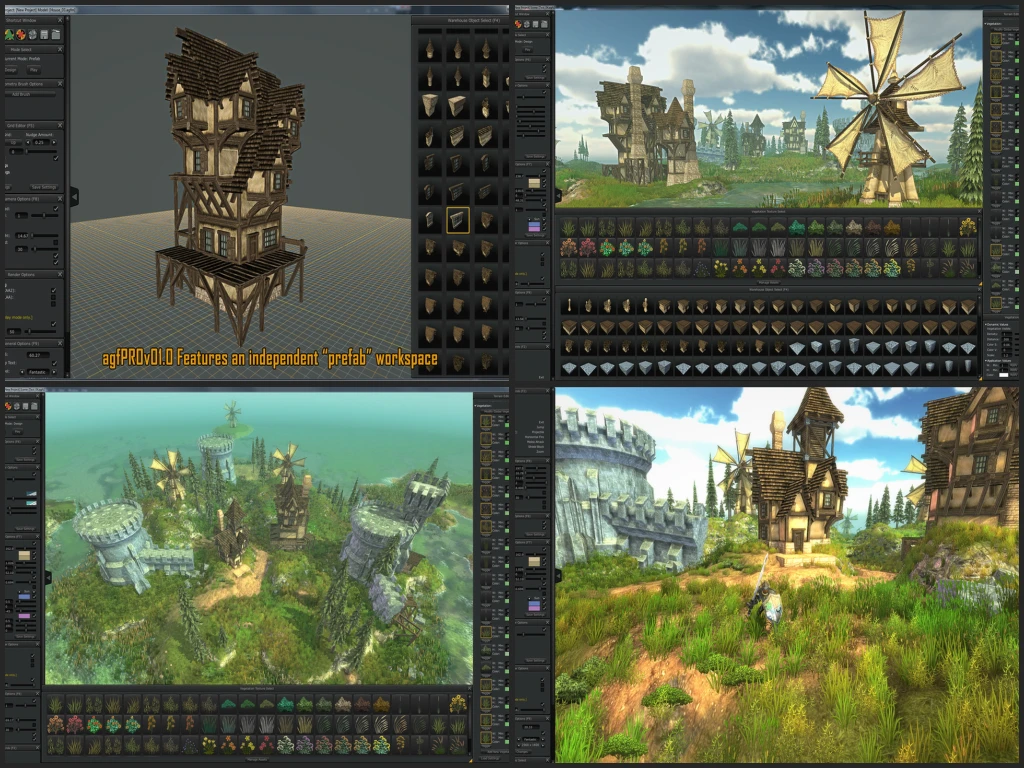
The redesigned interface adds dropdown menus, movable windows and a significantly faster terrain-sculpting system. The update introduces smoothing tools, directional indicators, underwater atmosphere adjustments and a build-time tracker stored within scene files. A project creation wizard provides preset themes with predefined terrain, lighting, water and vegetation settings. Terrain editing is improved with adjustable dimensions, real-time deformation, tri-planar texturing and an extensive brush library supporting custom PNG imports.
Vegetation, Lighting and Atmosphere Tools
Vegetation customization includes density, draw distance, color spectrum, size and global settings for saturation and value. Lighting options offer configurable key, fill, back and ambient sources, shadow adjustments and a collection of lens flares. Fog tools support color, height, density and falloff settings, while skybox rotation and tinting options are available. Water settings include tunable direction, intensity, speed, refraction, reflection and foam behavior.
Asset Construction and Management
The Construct App operates as a separate workspace for building complex prefab structures using the library of available assets or imported OBJ and PNG files. Imported models can be grouped and saved as new prefabs for use in the World Editor. The integrated Browser links all AGF components and enables users to load custom textures and objects without relying on Unity. The Packager allows users to generate standalone, DRM-free builds of their projects for distribution, requiring no additional software for recipients.
Scene Integration and Player Modes
The Scene Loader imports AGF scenes, custom terrain textures and supported OBJ files into Unity. Three player modules—ARPG, Platform and FPS—allow immediate in-tool testing or external packaging for sharing. The FPS module supports scene linking for extended multi-map gameplay and includes weapon asset packs.
Premium Edition Functions
The Premium version allows batch asset processing, icon generation and usage of over five hundred included art assets. It enables developers to integrate their own models and extend maps for commercial stand-alone releases when used with Unity Free or Pro.
Our Verdict
Axis Game Factory's AGFPRO v3 is a solid toolkit for anyone wanting to create game levels quickly and easily. It gives you tons of assets, pre-set themes, and simple tools that let you sculpt terrain, place objects, and design environments without needing to code or model. The new version is faster and more flexible than ever, making it approachable for beginners and hobbyists.
If you are a serious game developer or want full control with Unity integration, AGFPRO also offers Premium features that let you import your own models, tweak lighting, and package games for sharing. The workflow improvements, scene loader, and packager make it a practical choice for both learning and actual game projects.
Overall, we recommend AGFPRO v3. It is easy to use, packed with useful features, and a great way to bring your game ideas to life. Whether you are learning level design or creating a full project, this toolkit is worth checking out.