

liquivid (2015)
Tags:
UtilitiesPhoto EditingVideo Production
| macOS |
Released: 2015-04-20Requirements
|
||||||||||||
| PC |
Released: 2015-04-20Requirements
|
Description
liquivid is a user-friendly, highly intuitive software designed to enhance both videos and photos effortlessly. The application allows users to clean up, refine, and elevate their visual content with just a single click, ensuring an improved experience for viewing, sharing, and enjoying captured memories.
Video Stabilization
liquivid offers precise optical stabilization for videos, making it particularly effective for footage shot by hand or with action cameras. This feature minimizes shakiness, producing smoother, more professional-looking clips without requiring advanced editing skills.
Visual Effects
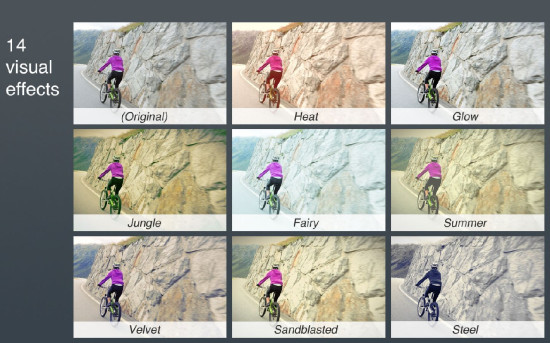
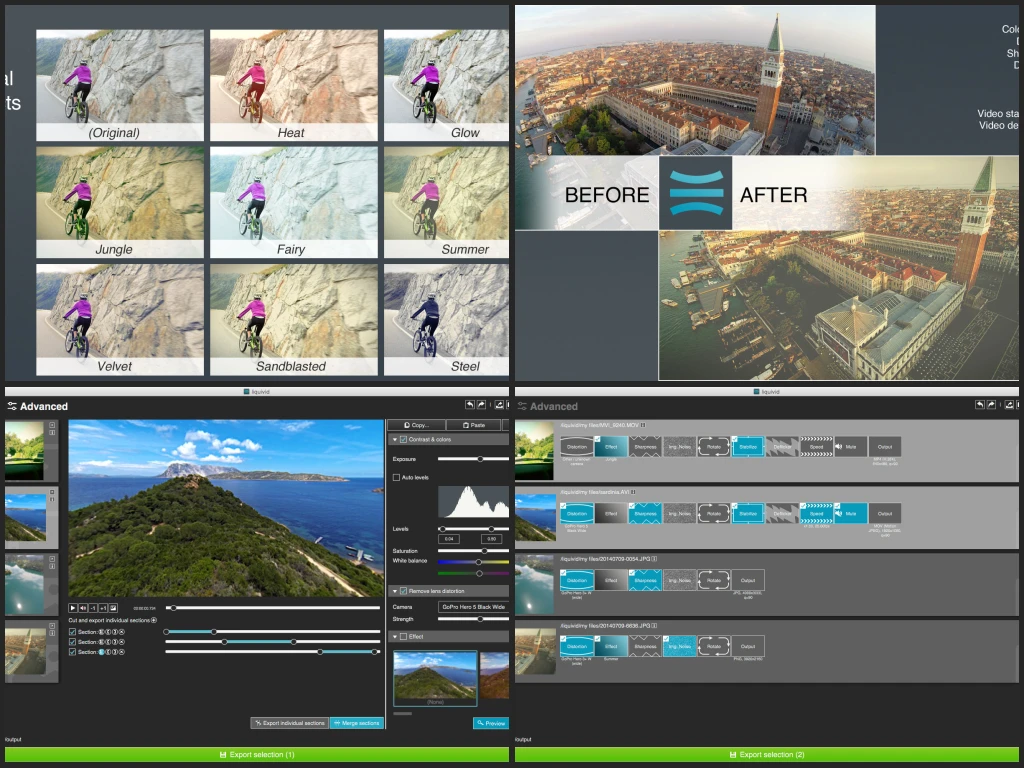
The software provides a collection of visual effects that allow photos and videos to gain distinctive looks and enhanced aesthetic qualities. These effects are designed to enrich your media with subtle or dramatic improvements, tailored to the style you want to achieve.
Lens Distortion Correction
Wide-angle lenses, commonly found in action cameras, can produce fish-eye distortion. liquivid includes an advanced defishing feature to remove these distortions from both photos and videos. The program contains built-in camera profiles for popular models, including GoPro Hero series (3, 3+, 4, 4 Session, 5, 5 Session), Sony HDR-AS100V, HDR-AS50, HDR-CX220, FDR-X1000V, Drift HD Ghost, SJCAM SJ4000 & SJ5000, DJI Phantom 3 & Zenmuse X3, Garmin VIRB, Parrot Bebop 2, Rollei 6S, Rollei 410, Zoom Q8, GitUp Git2, and Mobius ActionCam (lenses A, C2). Users can also create custom profiles for any camera or lens combination.
Noise Reduction
liquivid effectively reduces noise in photos and videos caused by low-light conditions or high ISO settings. This denoising capability ensures that images retain clarity and visual quality, even in challenging lighting environments.
Contrast and Color Enhancement
The program improves contrast and saturation levels, enhancing colors and making visual content appear more vivid and true-to-life. This feature helps both photos and videos stand out with a more polished appearance.
Sharpening Tools
liquivid sharpens images and video frames, enhancing detail and providing a crisper, more defined look. This ensures that all content appears clear and visually appealing, regardless of the original quality.
Rotation and Cropping
Videos and photos can be rotated by fixed angles such as 90°, 180°, or 270°, or by custom angles to fit specific framing needs. Cropping tools allow precise trimming and framing adjustments for optimal composition.
Deflickering
The software can remove flickering from time-lapse sequences and videos recorded under inconsistent lighting conditions, providing a smooth viewing experience without distracting visual artifacts.
Playback Speed Adjustment
liquivid enables modification of video playback speed, which is essential for creating slow-motion effects from high-frame-rate footage commonly recorded by action cameras. Users can easily slow down or speed up their videos while preserving smoothness and quality.
Basic Video Editing
Users can trim and cut video segments to export only the most important portions. This simplifies the editing workflow and helps focus on the most valuable content without unnecessary portions.
Batch Processing
With batch processing, liquivid allows multiple files to be edited simultaneously, saving time and effort. Users can apply effects, corrections, and enhancements to entire folders of media in just a few clicks.
Supported Formats
Input Formats: Photos – JPG, PNG, TIFF; Videos – all common formats and codecs in any resolution, including HD, 2K, 2.7K, and 4K.
Output Formats: Photos – JPG, PNG; Videos – MP4 (h264), WMV, Motion JPEG, WebM, GIF, uncompressed AVI in any resolution including HD, 2K, 2.7K, and 4K, supporting high bitrates.
Free Trial Availability
A free trial version of liquivid can be downloaded directly from the official website, allowing users to explore all features and test its capabilities before purchasing. Visit http://liquivid.com/ to access the trial version.
Our Verdict
Liquivid is a solid choice for anyone looking to quickly improve their videos and photos without diving into complicated software. It stabilizes shaky footage, fixes lens distortion, reduces noise, and enhances colors and sharpness with just a few clicks. The interface is simple and approachable, making it easy to get professional-looking results fast.
It also supports all common video formats and resolutions, including 4K, and offers batch processing for multiple files at once. Basic editing features like cutting, rotating, and speed adjustments are included, which makes it practical for everyday use. While it may not replace full-featured editors for advanced projects, it handles everyday fixes exceptionally well.
Overall, we recommend Liquivid for casual and semi-professional users who want quick, effective improvements to their media. It’s intuitive, versatile, and gets the job done without unnecessary complexity.